SDK2 Introduction for Those Who Know The Legacy SDK
This article gives you a short comparison between the legacy KitchenDraw SDK (sometimes named SDK1 here) and new KitchenDraw SDK2, and provides some recommendations about switching from the legacy SDK to the new SDK2.
The legacy KitchenDaw SDK is mainly a .NET wrapper around a C/C++ API exported from the dv.dll. It is well documented and allowed developers for years to access lots of functionalities and data in KitchenDraw itself, its scenes and catalogs. It allows to develop plugins for KitchenDraw.
While SDK2 offers about the same set of features, it does it in truly object-oriented and type-safe manner. The new design is aimed to facilitate proper code writing, thus allowing you to develop reliable code in an easier way.
The documentation was also revised thoroughly to allow faster learning and better knowledge transmission.
Our goal was to standardize a plugin development and also make it easier and faster for beginners. Thanks to the better API design and example-rich documentation, one required to have only a minimal knowledge of C# and .NET to start developing. While more experienced ones can benefit from better integration between the SDK2 and .NET platform.
Getting started with the SDK2
The SDK2 design has inherited the Appli/Scene/Catalog/Dico classes
division from the legacy SDK. Therefore, you start your session in the SDK2 in
the same way as you did it in the legacy SDK, except of switching the
namespace:
SDK2:
// using KD.SDK2;
var appli = new Appli();
Scene, Catalog and Dico classes can be obtained in the same way as in the legacy SDK:
SDK2:
Scene scene = appli.Scene;
Each of the four classes contains exactly the same functionality as it was in the SDK1. But their design is changed. Most members are named in the same way as the were in the legacy SDK, but now they offer proper typing and object-oriented design.
For example, instead of ObjectGetInfo function that allows to obtain an
information of an object, the Scene class now contains a
nested class dedicated to objects - Scene.Object,
which exposes all the necessary information as properties. This allows to
produce a better and shorter code:
SDK1:
double posx;
string posxString = scene.ObjectGetInfo(-2, SceneEnum.ObjectInfo.POSX);

if (!double.TryParse(
    posxString,
    System.Globalization.NumberStyles.Any,
    System.Globalization.CultureInfo.InvariantCulture,
    out posx))
    throw new Exception("Failed to obtain posx");
SDK2:
double posx = scene.ActiveObject.PositionX;

// Please note that if there's no active object
// in the scene, ActiveObject will be null, so
// it's better to write:
posx = scene.ActiveObject?.PositionX ?? double.NaN;
Most of the data provided by the SDK2 is mapped to appropriate .NET types. For
example, Scene.Objects property implements
IEnumerable<Scene.Object> collection to allow you to iterate through a
scene's objects in a natural way:
SDK1:
int objectsNb = scene.SceneGetObjectsNb();

for (int rank = 0; rank < objectsNb; rank++)
{
    int objectId = scene.SceneGetObjectId(rank);

    string objectName = scene.ObjectGetInfo(objectId, SceneEnum.ObjectInfo.NAME);

    Console.WriteLine(objectName);
}
SDK2:
foreach(Scene.Object obj in scene.Objects)
    Console.WriteLine(obj.Name);
You can benefit even more thanks to the rich feature set of the .NET framework itself:
SDK2:
// Listing all the hidden objects:
var hiddenObjects = scene.Objects.Where(obj => obj.IsHidden);

foreach(Scene.Object obj in hiddenObjects)
  Console.WriteLine(obj.Name);

// Removing all objects taller than 2040:
scene.RemoveObjects(scene.Objects
  .Where(obj => obj.DimensionZ > 2040));

// Listing selected objects in some Windows Forms
// UI in the '{id}: {name}' format:
listBox.ItemsSource = scene.Selection
  .Select(obj => $"{obj.Id}: {obj.Name}");
Catalogs, Scenes, Documents, Suppliers, Sites, Users, and Plugins in the
Appli class; Objects, Shapes, Headings, and Generics in the Scene class,
Rows and Clusters in the Catalog class, and finally Entries in the Dico
class - are all designed in the same way that allows you convenient and
reliable access to the data.
Helper Classes
Some complex data types, like objects' finishes configuration or shapes, aren't mapped to their type-safe representations but just left as strings, mostly for performance reasons. However, this doesn't mean that you have to parse the corresponding strings on your own. The SDK2 offers special classes for parsing such strings.
For example, a shape string, obtained via Object.Shape property, can be parsed into its object-oriented representation like that:
string shapeString = obj.Shape;
string shapeUnit = obj.Unit;

Scene.Shape shape = new Scene.Shape(shapeUnit, shapeString);

//Now you can access individual points of a shape
foreach(Scene.Shape.Point p in shape)
  Console.WriteLine($"({p.X},{p.Y}");
The formats of the strings, and the classes that can be employed to parse them, are all described in the documentation of the appropriate properties. Just be attentive to the Remarks section in the documentation.
Exceptions
Unlike the legacy SDK, which uses special return values to indicate errors, the SDK2 relies heavily on exceptions.
The following exceptions are thrown from the SDK2:
| Exception class | Reasons |
|---|---|
Sdk2Exception and its descendants |
for the SDK- and KitchenDraw-related errors; |
NotSupportedException |
by members in the KDS.SDK2.dll that are only supported in the KD.SDK2.dll and vice versa; |
ArgumentNullException |
for arguments that should not be null; |
ArgumentOutOfRangeException |
when the element out of available range is queried from collection-like properties like Scene.Objects, Scene.Generics, Appli.Users, Catalog.Rows, etc. |
The methods that are prone to exceptions are offered in both flavors. For example, Scene.Load method which load a scene will thrown an exception, while its TryLoad will just return false instead.
The Documentation and IntelliSense
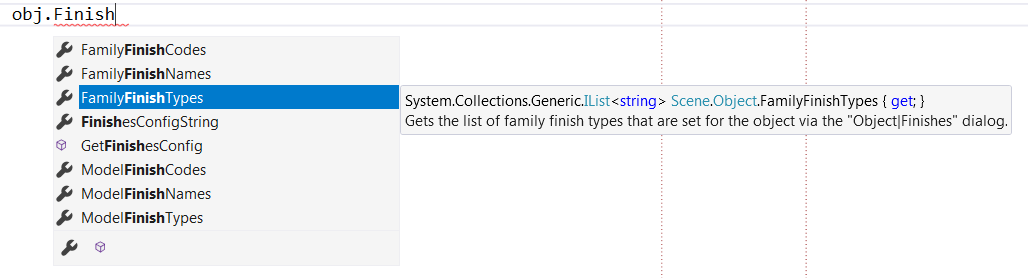
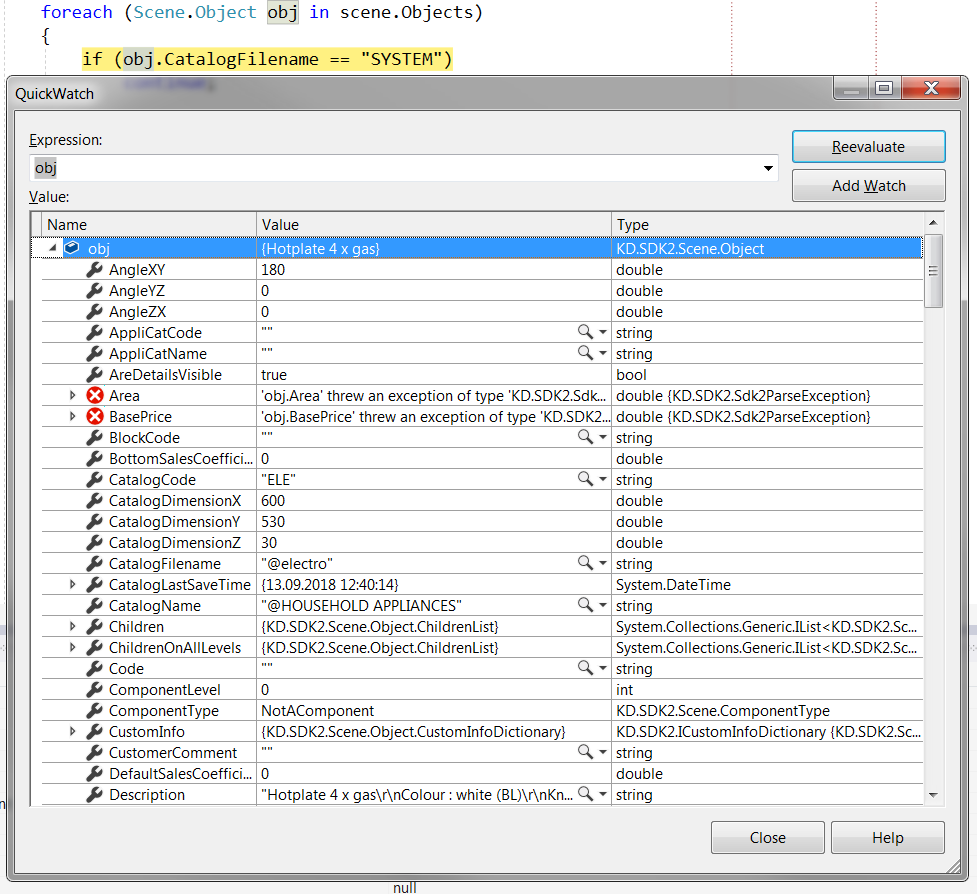
The SDK2 is designed with IntelliSense in mind. In particular, most data members are now exposed as properties so that you can get best of your IDE facilities like hints, code completion and runtime object runtime inspecting:
Conclusion
To extend KitchenDraw, you can use either the legacy SDK or the new SDK2. We aren't planning to drop support of the legacy SDK in a foreseeable future.
But while both APIs offer nearly the same feature set at a moment, with personally would recommend you to use the SDK2 for the development as it is designed in a more modern manner, offers you better experience and requires less effort to develop plugins comparing to the legacy SDK.